Saturday, May 5, 2012

Retrieve individual items in cursor


Retrieve individual items in cursor

In the last exercise "Add data to SQLite database, with SimpleCursorAdapter updated dynamically", to retrieve individual items associated with the cursor when any list item clicked. We can use the code:

Cursor cursor = (Cursor) parent.getItemAtPosition(position);
int item_id = cursor.getInt(cursor.getColumnIndex(SQLiteAdapter.KEY_ID));
String item_content1 = cursor.getString(cursor.getColumnIndex(SQLiteAdapter.KEY_CONTENT1));
String item_content2 = cursor.getString(cursor.getColumnIndex(SQLiteAdapter.KEY_CONTENT2));

Retrieve individual items in cursor

Modify AndroidSQLite.java listContentOnItemClickListener() to handle the OnItemClick event of the ListView.
package com.exercise.AndroidSQLite;

import android.app.Activity;
import android.database.Cursor;
import android.os.Bundle;
import android.view.View;
import android.widget.AdapterView;
import android.widget.Button;
import android.widget.EditText;
import android.widget.ListView;
import android.widget.SimpleCursorAdapter;
import android.widget.Toast;

public class AndroidSQLite extends Activity {

EditText inputContent1, inputContent2;
Button buttonAdd, buttonDeleteAll;

private SQLiteAdapter mySQLiteAdapter;
ListView listContent;

SimpleCursorAdapter cursorAdapter;
Cursor cursor;

   /** Called when the activity is first created. */
   @Override
   public void onCreate(Bundle savedInstanceState) {
       super.onCreate(savedInstanceState);
       setContentView(R.layout.main);
      
       inputContent1 = (EditText)findViewById(R.id.content1);
       inputContent2 = (EditText)findViewById(R.id.content2);
       buttonAdd = (Button)findViewById(R.id.add);
       buttonDeleteAll = (Button)findViewById(R.id.deleteall);
      
       listContent = (ListView)findViewById(R.id.contentlist);

       mySQLiteAdapter = new SQLiteAdapter(this);
       mySQLiteAdapter.openToWrite();

       cursor = mySQLiteAdapter.queueAll();
       String[] from = new String[]{SQLiteAdapter.KEY_ID, SQLiteAdapter.KEY_CONTENT1, SQLiteAdapter.KEY_CONTENT2};
       int[] to = new int[]{R.id.id, R.id.text1, R.id.text2};
       cursorAdapter =
        new SimpleCursorAdapter(this, R.layout.row, cursor, from, to);
       listContent.setAdapter(cursorAdapter);
       listContent.setOnItemClickListener(listContentOnItemClickListener);
      
       buttonAdd.setOnClickListener(buttonAddOnClickListener);
       buttonDeleteAll.setOnClickListener(buttonDeleteAllOnClickListener);
      
   }
  
   Button.OnClickListener buttonAddOnClickListener
   = new Button.OnClickListener(){

 @Override
 public void onClick(View arg0) {
  // TODO Auto-generated method stub
  String data1 = inputContent1.getText().toString();
  String data2 = inputContent2.getText().toString();
  mySQLiteAdapter.insert(data1, data2);
  updateList();
 }
   
   };
  
   Button.OnClickListener buttonDeleteAllOnClickListener
   = new Button.OnClickListener(){

 @Override
 public void onClick(View arg0) {
  // TODO Auto-generated method stub
  mySQLiteAdapter.deleteAll();
  updateList();
 }
   
   };
  
   private ListView.OnItemClickListener listContentOnItemClickListener
   = new ListView.OnItemClickListener(){

 @Override
 public void onItemClick(AdapterView<?> parent, View view, int position,
   long id) {
  // TODO Auto-generated method stub
 
  Cursor cursor = (Cursor) parent.getItemAtPosition(position);
  int item_id = cursor.getInt(cursor.getColumnIndex(SQLiteAdapter.KEY_ID));
           String item_content1 = cursor.getString(cursor.getColumnIndex(SQLiteAdapter.KEY_CONTENT1));
           String item_content2 = cursor.getString(cursor.getColumnIndex(SQLiteAdapter.KEY_CONTENT2));
          
           String item = String.valueOf(item_id) + " : " + item_content1 +"\n"
                +item_content2;
  Toast.makeText(AndroidSQLite.this, item, Toast.LENGTH_LONG).show();
 }};

@Override
protected void onDestroy() {
 // TODO Auto-generated method stub
 super.onDestroy();
 mySQLiteAdapter.close();
}


private void updateList(){
 cursor.requery();
   }

}


Other files follow the last post "Add data to SQLite database, with SimpleCursorAdapter updated dynamically".

A simple example using Android's SQLite database, exposes data from Cursor to a ListView.


A simple example using Android's SQLite database, exposes data from Cursor to a ListView.

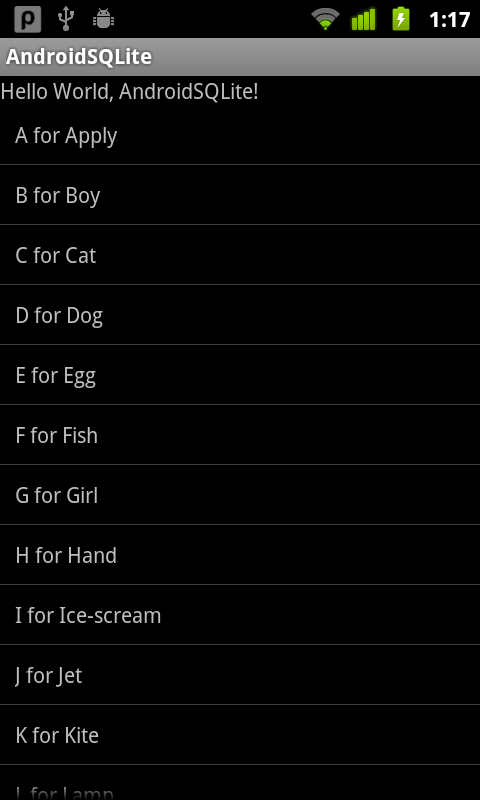
In previous exercise "A simple example using Android's SQLite database", the result of queue was presented as string. It's going to be modified to exposes data from Cursor to a ListView widget.

A simple example using Android's SQLite database, exposes data from Cursor to a ListView.

Modify SQLiteAdapter.java to include a column of "_id" in our database, also include it in the queue. Modify the return of queueAll() to Cursor. Refer to the article "column '_id' does not exist".
package com.exercise.AndroidSQLite;

import android.content.ContentValues;
import android.content.Context;
import android.database.Cursor;
import android.database.sqlite.SQLiteDatabase;
import android.database.sqlite.SQLiteOpenHelper;
import android.database.sqlite.SQLiteDatabase.CursorFactory;

public class SQLiteAdapter {

public static final String MYDATABASE_NAME = "MY_DATABASE";
public static final String MYDATABASE_TABLE = "MY_TABLE";
public static final int MYDATABASE_VERSION = 1;
public static final String KEY_ID = "_id";
public static final String KEY_CONTENT = "Content";

//create table MY_DATABASE (ID integer primary key, Content text not null);
private static final String SCRIPT_CREATE_DATABASE =
"create table " + MYDATABASE_TABLE + " ("
+ KEY_ID + " integer primary key autoincrement, "
+ KEY_CONTENT + " text not null);";

private SQLiteHelper sqLiteHelper;
private SQLiteDatabase sqLiteDatabase;

private Context context;

public SQLiteAdapter(Context c){
context = c;
}

public SQLiteAdapter openToRead() throws android.database.SQLException {
sqLiteHelper = new SQLiteHelper(context, MYDATABASE_NAME, null, MYDATABASE_VERSION);
sqLiteDatabase = sqLiteHelper.getReadableDatabase();
return this;
}

public SQLiteAdapter openToWrite() throws android.database.SQLException {
sqLiteHelper = new SQLiteHelper(context, MYDATABASE_NAME, null, MYDATABASE_VERSION);
sqLiteDatabase = sqLiteHelper.getWritableDatabase();
return this;
}

public void close(){
sqLiteHelper.close();
}

public long insert(String content){

ContentValues contentValues = new ContentValues();
contentValues.put(KEY_CONTENT, content);
return sqLiteDatabase.insert(MYDATABASE_TABLE, null, contentValues);
}

public int deleteAll(){
return sqLiteDatabase.delete(MYDATABASE_TABLE, null, null);
}

public Cursor queueAll(){
String[] columns = new String[]{KEY_ID, KEY_CONTENT};
Cursor cursor = sqLiteDatabase.query(MYDATABASE_TABLE, columns,
  null, null, null, null, null);

return cursor;
}

public class SQLiteHelper extends SQLiteOpenHelper {

public SQLiteHelper(Context context, String name,
  CursorFactory factory, int version) {
 super(context, name, factory, version);
}

@Override
public void onCreate(SQLiteDatabase db) {
 // TODO Auto-generated method stub
 db.execSQL(SCRIPT_CREATE_DATABASE);
}

@Override
public void onUpgrade(SQLiteDatabase db, int oldVersion, int newVersion) {
 // TODO Auto-generated method stub

}

}

}


Create /res/layout/row.xml for our ListView
<?xml version="1.0" encoding="utf-8"?>
<TextView xmlns:android="http://schemas.android.com/apk/res/android"
android:id="@+id/text"
android:layout_width="fill_parent"
android:layout_height="fill_parent"
android:padding="10dip"/>


Modify main.xml to change the result(contentlist) from TextView to ListView.
<?xml version="1.0" encoding="utf-8"?>
<LinearLayout xmlns:android="http://schemas.android.com/apk/res/android"
  android:orientation="vertical"
  android:layout_width="fill_parent"
  android:layout_height="fill_parent"
  >
<TextView
  android:layout_width="fill_parent"
  android:layout_height="wrap_content"
  android:text="@string/hello"
  />
<ListView
android:id="@+id/contentlist"
android:layout_width="fill_parent"
android:layout_height="fill_parent"/>
</LinearLayout>


Finally, modify AndroidSQLite.java
package com.exercise.AndroidSQLite;

import android.app.Activity;
import android.database.Cursor;
import android.os.Bundle;
import android.widget.ListView;
import android.widget.SimpleCursorAdapter;

public class AndroidSQLite extends Activity {

private SQLiteAdapter mySQLiteAdapter;

  /** Called when the activity is first created. */
  @Override
  public void onCreate(Bundle savedInstanceState) {
      super.onCreate(savedInstanceState);
      setContentView(R.layout.main);
      ListView listContent = (ListView)findViewById(R.id.contentlist);
    
      /*
       *  Create/Open a SQLite database
       *  and fill with dummy content
       *  and close it
       */
      mySQLiteAdapter = new SQLiteAdapter(this);
      mySQLiteAdapter.openToWrite();
      mySQLiteAdapter.deleteAll();

      mySQLiteAdapter.insert("A for Apply");
      mySQLiteAdapter.insert("B for Boy");
      mySQLiteAdapter.insert("C for Cat");
      mySQLiteAdapter.insert("D for Dog");
      mySQLiteAdapter.insert("E for Egg");
      mySQLiteAdapter.insert("F for Fish");
      mySQLiteAdapter.insert("G for Girl");
      mySQLiteAdapter.insert("H for Hand");
      mySQLiteAdapter.insert("I for Ice-scream");
      mySQLiteAdapter.insert("J for Jet");
      mySQLiteAdapter.insert("K for Kite");
      mySQLiteAdapter.insert("L for Lamp");
      mySQLiteAdapter.insert("M for Man");
      mySQLiteAdapter.insert("N for Nose");
      mySQLiteAdapter.insert("O for Orange");
      mySQLiteAdapter.insert("P for Pen");
      mySQLiteAdapter.insert("Q for Queen");
      mySQLiteAdapter.insert("R for Rain");
      mySQLiteAdapter.insert("S for Sugar");
      mySQLiteAdapter.insert("T for Tree");
      mySQLiteAdapter.insert("U for Umbrella");
      mySQLiteAdapter.insert("V for Van");
      mySQLiteAdapter.insert("W for Water");
      mySQLiteAdapter.insert("X for X'mas");
      mySQLiteAdapter.insert("Y for Yellow");
      mySQLiteAdapter.insert("Z for Zoo");
    
      mySQLiteAdapter.close();

      /*
       *  Open the same SQLite database
       *  and read all it's content.
       */
      mySQLiteAdapter = new SQLiteAdapter(this);
      mySQLiteAdapter.openToRead();

      Cursor cursor = mySQLiteAdapter.queueAll();
      startManagingCursor(cursor);

      String[] from = new String[]{SQLiteAdapter.KEY_CONTENT};
      int[] to = new int[]{R.id.text};

      SimpleCursorAdapter cursorAdapter =
       new SimpleCursorAdapter(this, R.layout.row, cursor, from, to);

      listContent.setAdapter(cursorAdapter);
    
      mySQLiteAdapter.close();

    
  }
}

A simple example using Android's SQLite database


A simple example using Android's SQLite database

It's a simple example using Android's SQLite database. A adapter, SQLiteAdapter, is implement as a adapter between our activity and SQLite, with a inner class SQLiteHelper which extends SQLiteOpenHelper.

The SQLite database have only one field, "Content". When the app start, it will open the database and delete all first, then insert some dummy data, then close it. And Re-open, read all content.

A simple example using Android's SQLite database

AndroidSQLite.java
package com.exercise.AndroidSQLite;

import android.app.Activity;
import android.os.Bundle;
import android.widget.TextView;

public class AndroidSQLite extends Activity {
 
 private SQLiteAdapter mySQLiteAdapter;
 
    /** Called when the activity is first created. */
    @Override
    public void onCreate(Bundle savedInstanceState) {
        super.onCreate(savedInstanceState);
        setContentView(R.layout.main);
        TextView listContent = (TextView)findViewById(R.id.contentlist);
        
        /*
         *  Create/Open a SQLite database
         *  and fill with dummy content
         *  and close it
         */
        mySQLiteAdapter = new SQLiteAdapter(this);
        mySQLiteAdapter.openToWrite();
        mySQLiteAdapter.deleteAll();
        mySQLiteAdapter.insert("ABCDE");
        mySQLiteAdapter.insert("FGHIJK");
        mySQLiteAdapter.insert("1234567");
        mySQLiteAdapter.insert("890");
        mySQLiteAdapter.insert("Testing");
        mySQLiteAdapter.close();

        /*
         *  Open the same SQLite database
         *  and read all it's content.
         */
        mySQLiteAdapter = new SQLiteAdapter(this);
        mySQLiteAdapter.openToRead();
        String contentRead = mySQLiteAdapter.queueAll();
        mySQLiteAdapter.close();
        
        listContent.setText(contentRead);
        
    }
}


SQLiteAdapter.java
package com.exercise.AndroidSQLite;

import android.content.ContentValues;
import android.content.Context;
import android.database.Cursor;
import android.database.sqlite.SQLiteDatabase;
import android.database.sqlite.SQLiteOpenHelper;
import android.database.sqlite.SQLiteDatabase.CursorFactory;

public class SQLiteAdapter {

 public static final String MYDATABASE_NAME = "MY_DATABASE";
 public static final String MYDATABASE_TABLE = "MY_TABLE";
 public static final int MYDATABASE_VERSION = 1;
 public static final String KEY_CONTENT = "Content";

 //create table MY_DATABASE (ID integer primary key, Content text not null);
 private static final String SCRIPT_CREATE_DATABASE =
  "create table " + MYDATABASE_TABLE + " ("
  + KEY_CONTENT + " text not null);";
 
 private SQLiteHelper sqLiteHelper;
 private SQLiteDatabase sqLiteDatabase;

 private Context context;
 
 public SQLiteAdapter(Context c){
  context = c;
 }
 
 public SQLiteAdapter openToRead() throws android.database.SQLException {
  sqLiteHelper = new SQLiteHelper(context, MYDATABASE_NAME, null, MYDATABASE_VERSION);
  sqLiteDatabase = sqLiteHelper.getReadableDatabase();
  return this; 
 }
 
 public SQLiteAdapter openToWrite() throws android.database.SQLException {
  sqLiteHelper = new SQLiteHelper(context, MYDATABASE_NAME, null, MYDATABASE_VERSION);
  sqLiteDatabase = sqLiteHelper.getWritableDatabase();
  return this; 
 }
 
 public void close(){
  sqLiteHelper.close();
 }
 
 public long insert(String content){
  
  ContentValues contentValues = new ContentValues();
  contentValues.put(KEY_CONTENT, content);
  return sqLiteDatabase.insert(MYDATABASE_TABLE, null, contentValues);
 }
 
 public int deleteAll(){
  return sqLiteDatabase.delete(MYDATABASE_TABLE, null, null);
 }
 
 public String queueAll(){
  String[] columns = new String[]{KEY_CONTENT};
  Cursor cursor = sqLiteDatabase.query(MYDATABASE_TABLE, columns, 
    null, null, null, null, null);
  String result = "";
  
  int index_CONTENT = cursor.getColumnIndex(KEY_CONTENT);
  for(cursor.moveToFirst(); !(cursor.isAfterLast()); cursor.moveToNext()){
   result = result + cursor.getString(index_CONTENT) + "\n";
  }
 
  return result;
 }
 
 public class SQLiteHelper extends SQLiteOpenHelper {

  public SQLiteHelper(Context context, String name,
    CursorFactory factory, int version) {
   super(context, name, factory, version);
  }

  @Override
  public void onCreate(SQLiteDatabase db) {
   // TODO Auto-generated method stub
   db.execSQL(SCRIPT_CREATE_DATABASE);
  }

  @Override
  public void onUpgrade(SQLiteDatabase db, int oldVersion, int newVersion) {
   // TODO Auto-generated method stub

  }

 }
 
}


main.xml
<?xml version="1.0" encoding="utf-8"?>
<LinearLayout xmlns:android="http://schemas.android.com/apk/res/android"
    android:orientation="vertical"
    android:layout_width="fill_parent"
    android:layout_height="fill_parent"
    >
<TextView  
    android:layout_width="fill_parent" 
    android:layout_height="wrap_content" 
    android:text="@string/hello"
    />
<TextView
 android:id="@+id/contentlist"
 android:layout_width="fill_parent"
 android:layout_height="wrap_content"/>
</LinearLayout>