Saturday, May 5, 2012

Pick a file using Intent.ACTION_GET_CONTENT


Pick a file using Intent.ACTION_GET_CONTENT

If you have to pick a file in your app, but you don't want to implement your own file explorer; you can start a activity with intent of Intent.ACTION_GET_CONTENT. Android OS will choice a suitable app with such function for you.
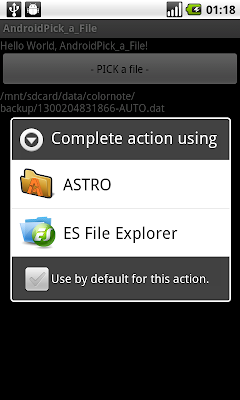
Pick a file using Intent.ACTION_GET_CONTENT

package com.exercise.AndroidPick_a_File;

import android.app.Activity;
import android.content.Intent;
import android.os.Bundle;
import android.view.View;
import android.widget.Button;
import android.widget.TextView;

public class AndroidPick_a_File extends Activity {
 
 TextView textFile;
 
 private static final int PICKFILE_RESULT_CODE = 1;
 
   /** Called when the activity is first created. */
   @Override
   public void onCreate(Bundle savedInstanceState) {
       super.onCreate(savedInstanceState);
       setContentView(R.layout.main);
      
       Button buttonPick = (Button)findViewById(R.id.buttonpick);
       textFile = (TextView)findViewById(R.id.textfile);
      
       buttonPick.setOnClickListener(new Button.OnClickListener(){

   @Override
   public void onClick(View arg0) {
    // TODO Auto-generated method stub

    Intent intent = new Intent(Intent.ACTION_GET_CONTENT);
             intent.setType("file/*");
       startActivityForResult(intent,PICKFILE_RESULT_CODE);
    
   }});
   }

 @Override
 protected void onActivityResult(int requestCode, int resultCode, Intent data) {
  // TODO Auto-generated method stub
  switch(requestCode){
  case PICKFILE_RESULT_CODE:
   if(resultCode==RESULT_OK){
    String FilePath = data.getData().getPath();
    textFile.setText(FilePath);
   }
   break;
   
  }
 }
}


main.xml
<?xml version="1.0" encoding="utf-8"?>
<LinearLayout xmlns:android="http://schemas.android.com/apk/res/android"
   android:orientation="vertical"
   android:layout_width="fill_parent"
   android:layout_height="fill_parent"
   >
<TextView 
   android:layout_width="fill_parent"
   android:layout_height="wrap_content"
   android:text="@string/hello"
   />
<Button
   android:id="@+id/buttonpick"
   android:layout_width="fill_parent"
   android:layout_height="wrap_content"
   android:text="- PICK a file -"
   />
<TextView 
   android:id="@+id/textfile"
   android:layout_width="fill_parent"
   android:layout_height="wrap_content"
   />
</LinearLayout>

SlidingDrawer


SlidingDrawer

SlidingDrawer hides content out of the screen and allows the user to drag a handle to bring the content on screen. SlidingDrawer can be used vertically or horizontally. A special widget composed of two children views: the handle, that the users drags, and the content, attached to the handle and dragged with it. SlidingDrawer should be used as an overlay inside layouts. This means SlidingDrawer should only be used inside of a FrameLayout or a RelativeLayout for instance. The size of the SlidingDrawer defines how much space the content will occupy once slid out so SlidingDrawer should usually use match_parent for both its dimensions. Inside an XML layout, SlidingDrawer must define the id of the handle and of the content.


<?xml version="1.0" encoding="utf-8"?>
<LinearLayout xmlns:android="http://schemas.android.com/apk/res/android"
   android:orientation="vertical"
   android:layout_width="fill_parent"
   android:layout_height="fill_parent"
   >
<TextView 
   android:layout_width="fill_parent"
   android:layout_height="wrap_content"
   android:text="@string/hello"
   />
<FrameLayout
android:layout_width="fill_parent"
android:layout_height="300dip" 
android:layout_gravity="bottom"
android:background="#808080">
<TextView 
   android:layout_width="fill_parent"
   android:layout_height="wrap_content"
   android:text="Something here: \nIt's a exercise \nof SlidingDrawer"
   />
<SlidingDrawer
    android:id="@+id/drawer"
    android:layout_width="fill_parent"
    android:layout_height="wrap_content"
    android:orientation="vertical"
    android:handle="@+id/handle"
    android:content="@+id/content">
<ImageView
android:id="@id/handle"
android:layout_width="fill_parent"
android:layout_height="wrap_content"
android:src="@drawable/icon"
android:background="#404040"/>
<LinearLayout
    android:id="@id/content"
    android:layout_width="fill_parent"
    android:layout_height="200dip"
    android:orientation="vertical"
    android:background="#606060"
    >
<Button
    android:layout_width="fill_parent"
    android:layout_height="wrap_content"
    android:text=" - Button - "/>
<Button
    android:layout_width="fill_parent"
    android:layout_height="wrap_content"
    android:text=" - Button - "/>
<Button
    android:layout_width="fill_parent"
    android:layout_height="wrap_content"
    android:text=" - Button - "/>
<TextView
    android:layout_width="fill_parent"
    android:layout_height="wrap_content"
    android:text="It's content of SlidingDrawer"/>
</LinearLayout>
</SlidingDrawer>
</FrameLayout>
<Button
    android:layout_width="fill_parent"
    android:layout_height="fill_parent"
    android:layout_margin="5dip"
    android:text=" - A Bit Button - "/>
</LinearLayout>

Get list of address from location using Geocoder

Get list of address from location using Geocoder

 In this exercise, a list of 5 addresses are retrieved; by submitting "5"(maxResult) in the third parameter of getFromLocation() method.

Get list of address from location using Geocoder

Modify main.xml to add a Spinner to show the returned address.
<?xml version="1.0" encoding="utf-8"?>
<LinearLayout xmlns:android="http://schemas.android.com/apk/res/android"
  android:orientation="vertical"
  android:layout_width="fill_parent"
  android:layout_height="fill_parent"
  >
<TextView
  android:layout_width="fill_parent"
  android:layout_height="wrap_content"
  android:text="@string/hello"
  />
<TextView
  android:layout_width="fill_parent"
  android:layout_height="wrap_content"
  android:text="Location"
  android:background="#505050"
  />
<TextView
  android:id="@+id/mylatitude"
  android:layout_width="fill_parent"
  android:layout_height="wrap_content"
  />
<TextView
  android:id="@+id/mylongitude"
  android:layout_width="fill_parent"
  android:layout_height="wrap_content"
  />
<TextView
  android:layout_width="fill_parent"
  android:layout_height="wrap_content"
  android:text="Address"
  android:background="#505050"
  />
<TextView
  android:id="@+id/myaddress"
  android:layout_width="fill_parent"
  android:layout_height="wrap_content"
  />
<Spinner
  android:id="@+id/addresslist"
  android:layout_width="fill_parent"
  android:layout_height="wrap_content"
  />
</LinearLayout>


AndroidFromLocation.java
package com.exercise.AndroidFromLocation;

import java.io.IOException;
import java.util.List;
import java.util.Locale;

import android.app.Activity;
import android.location.Address;
import android.location.Geocoder;
import android.os.Bundle;
import android.widget.ArrayAdapter;
import android.widget.Spinner;
import android.widget.TextView;

public class AndroidFromLocation extends Activity {

double LATITUDE = 37.42233;
double LONGITUDE = -122.083;

final int maxResult =5;
String addressList[] = new String[maxResult];
private ArrayAdapter<String> adapter;

  /** Called when the activity is first created. */
  @Override
  public void onCreate(Bundle savedInstanceState) {
      super.onCreate(savedInstanceState);
      setContentView(R.layout.main);
      TextView myLatitude = (TextView)findViewById(R.id.mylatitude);
      TextView myLongitude = (TextView)findViewById(R.id.mylongitude);
      TextView myAddress = (TextView)findViewById(R.id.myaddress);
      Spinner myAddressList = (Spinner)findViewById(R.id.addresslist);
    
      myLatitude.setText("Latitude: " + String.valueOf(LATITUDE));
      myLongitude.setText("Longitude: " + String.valueOf(LONGITUDE));
    
      Geocoder geocoder = new Geocoder(this, Locale.ENGLISH);

      try {
  List<Address> addresses = geocoder.getFromLocation(LATITUDE, LONGITUDE, maxResult);
 
  if(addresses != null) {
  
   for (int j=0; j<maxResult; j++){
    Address returnedAddress = addresses.get(j);
    StringBuilder strReturnedAddress = new StringBuilder();
    for(int i=0; i<returnedAddress.getMaxAddressLineIndex(); i++) {
     strReturnedAddress.append(returnedAddress.getAddressLine(i)).append("\n");
    }
    addressList[j] = strReturnedAddress.toString();
   }
  
   adapter = new ArrayAdapter<String>(this,
     android.R.layout.simple_spinner_item, addressList);
   adapter.setDropDownViewResource(android.R.layout.
     simple_spinner_dropdown_item);
   myAddressList.setAdapter(adapter);
  }
  else{
   myAddress.setText("No Address returned!");
  }
 } catch (IOException e) {
  // TODO Auto-generated catch block
  e.printStackTrace();
  myAddress.setText("Canont get Address!");
 }
  }
}